How to add dimensions to an STL file
STL Ruler turns a 3D model into a clean 2D image with measurement lines: the picture buyers expect on a product listing. It runs in your browser, so there is nothing to install, no sign-up, and your STL never leaves your computer.
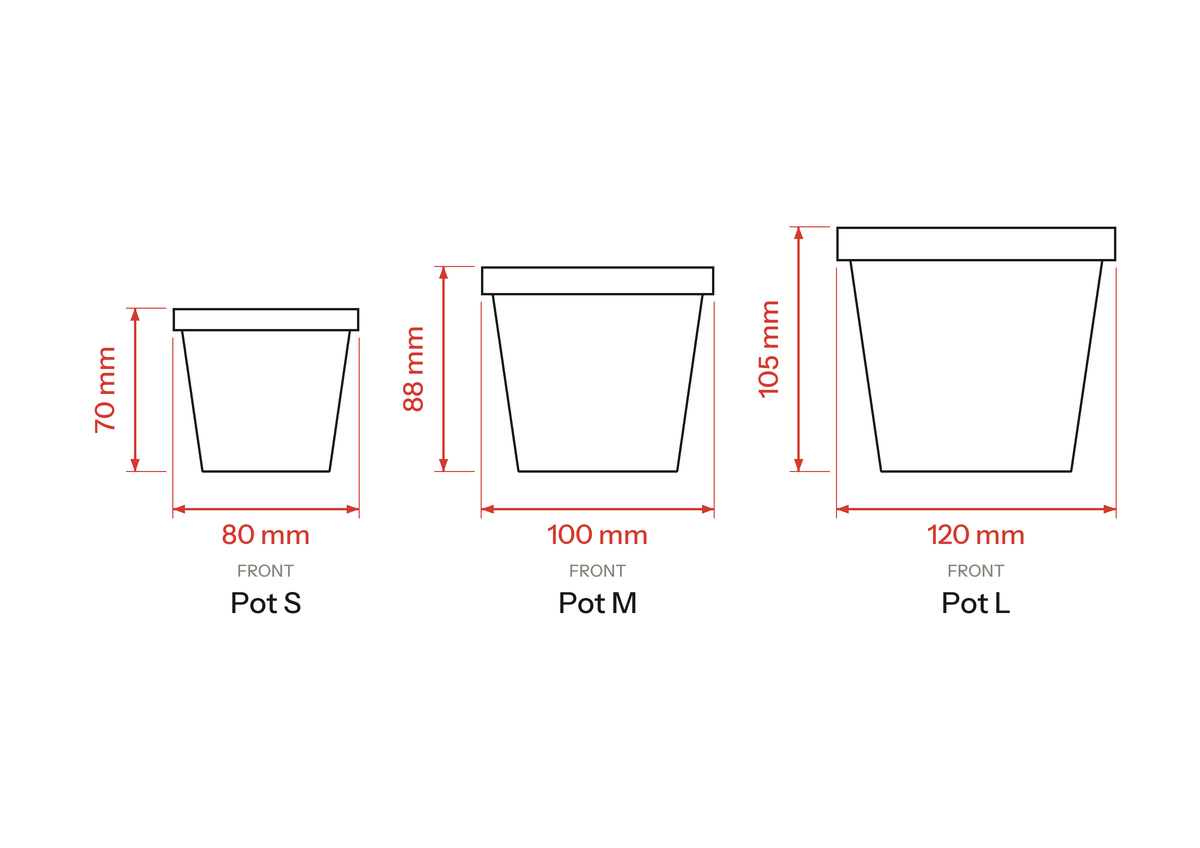
Add dimensions to an STL in 4 steps
-
Drop your STL file
Drag one or more STL files onto the page, or use Open. Binary and ASCII STL both work, and a whole size series (S, M, L, XL) can go in at once.
-
Pick a view
Choose front, back, side, top, bottom or isometric, or click any edge or corner of the view cube. Rotate in 90° steps or by any angle, and duplicate a model to show several views of the same part side by side.
-
Check the dimensions
Width and height appear automatically (plus depth in 3D views) and follow the model as you move or resize it. Drag them into place, change their colour, or add your own point-to-point rulers that snap to corners, edges and centres.
-
Choose units and export
Show millimetres, centimetres, decimal or fractional inches, or mm and inches together. Add labels, line up a series with one click, then export a JPG, free up to 1280 px. Your workspace is still there when you come back.
What people use it for
- Product listings for 3D-printed items on Etsy, eBay, Amazon or your own shop, so buyers see the real size before they order.
- Size charts for a series: every size on one image, lined up and labelled.
- A quick size check of an STL before you print it or quote it.
- Dimensioned drawings for a client or a spec sheet, as SVG or PDF, or DXF at 1:1 scale for CAD (Pro).
Free and Pro
Everything you need for a listing image is free. Pro is for vector files, very large images and saving your work in the cloud, from $5 a month, and you can cancel any time.
| Feature | Free | Pro |
|---|---|---|
| STL import, all views, automatic and manual dimensions | Yes | Yes |
| mm, cm, decimal and fractional inches | Yes | Yes |
| Labels, alignment, auto-arrange, built-in styles | Yes | Yes |
| JPG export | Up to 1280 px | Up to 8K (7680 px) |
| PNG with transparent background | — | Any size |
| SVG, PDF and DXF (1:1 mm) vector export | — | Yes |
| Save your own style presets | — | Yes |
| Compositions saved in the cloud | — | 16 to 128 |
Frequently asked questions
Is STL Ruler free?
Yes. Importing STL files, every view, automatic and manual dimensions, all units and JPG exports up to 1280 px are free, with no account needed. Pro adds PNG, SVG, DXF and PDF exports, sizes up to 8K and saved compositions, from $5 a month.
Do I need to install any software?
No. STL Ruler runs in any modern browser with WebGL (Chrome, Edge, Firefox, Safari) on Windows, macOS, Linux and ChromeOS. Open stlruler.com and drop in a file.
Is my STL file uploaded?
No. Your STL file is read and drawn in your browser and never leaves your computer. Pro exports are rendered on the server from the finished 2D drawing only, never from the 3D file.
My STL shows the wrong size. What do I do?
STL files store no units, so STL Ruler reads them as millimetres, which is what most slicers and CAD tools export. If your file was saved in centimetres, metres or inches, choose that unit for the model and it is rescaled to its true size.
Can I show dimensions in inches?
Yes: millimetres, centimetres, decimal inches, fractional inches (1/2 to 1/32) or millimetres and inches together. Fractional inches round up, so a 3.92″ pot reads 4″ rather than underselling its size.
Can I measure between two points?
Yes. The ruler tool adds point-to-point dimensions that snap to corners, edge endpoints, midpoints and centres, and they follow the model when you move it.
Can I export dimensions for CAD or print?
With Pro you can export SVG and PDF vector files and DXF at true 1:1 millimetre scale, with separate layers for outlines, hidden lines, dimensions and labels.
Ready to measure your model?
Drop an STL and get a dimensioned image in under a minute. Free, no sign-up.
Open STL Ruler